आप Free Pan Card Apply 2025 में पैन कार्ड कैसे बना सकते हैं, उसकी पूरी जानकारी यहां पर दी गई है ताकि आप घर बैठे पैन कार्ड बना सकें।
इसके लिए आपको गूगल क्रोम ओपन करना होगा। गूगल क्रोम ओपन करके गूगल में जाकर E Filling टाइप करें और सर्च करें।
यहां पर आपको इनकम टैक्स की मुख्य वेबसाइट पर इनकम टैक्स डिपार्टमेंट लिखा हुआ दिखाई देगा, उस वेबसाइट पर क्लिक करें।
यहां पर इनकम टैक्स डिपार्टमेंट द्वारा कई लिंक दी गई है, जिनमें से आपको instant E-Pan वाली लिंक पर क्लिक करना है।
Instant E-Pan वाली लिंक पर क्लिक करने से आपको गेट न्यू पैन कार्ड वाला ऑप्शन दिखाई देगा उस पर क्लिक करें।
Get New Pan Card पर क्लिक करने से आपको अपना आधार नंबर डालने का ऑप्शन दिखाई देगा। उसमें आपको अपना आधार नंबर इंटर करना है और कंटिन्यू पर क्लिक करें।
कंटिन्यू पर क्लिक करने से आपके मोबाइल में एक ओटीपी आया होगा, उसको यहां पर आपको इंटर करना है। आपके मोबाइल में ओटीपी तभी आएगा जब आपके आधार कार्ड में मोबाइल नंबर लिंक होगा।
ओटीपी इंटर करके सबमिट करने पर आपको सक्सेसफुल वाला एक मैसेज दिखाई देगा। उसको सेव कर लेना है या फिर प्रिंट निकाल लेना है ताकि भविष्य में आपको कोई दिक्कत हो तो काम आए।
थोड़े टाइम के बाद या एक दिन के बाद आपको फिर से इनकम टैक्स की वेबसाइट पर जाना है और डाउनलोड वाले ऑप्शन पर क्लिक करना है ताकि आप अपना आधार कार्ड डाउनलोड कर सकें।
Make an E Shram Card and get free insurance of Rs 2 lakh > E Shram Card Yojana.
E Shram Card Scheme, Gift e-Shram Card this Diwali Free insurance of Rs. 2 lakh to maids, housemaids, Shram Yogi, sales girls, sales boys, rickshaw pullers etc. working in your shop and nearby shops.
Who is eligible for the e-Shram card? > E Shram card Yojana
All persons whose age is between 16 to 59 years.
Who is not eligible for the e-Shram card? > E Shram card Yojana
Who is paying Income Tax and who is a member of CPS/NPS/EPFO/ESIC.
How to register E shram Card?
Registration can be done by visiting any CSC center near you.
Documents required for registration.
Aadhar Card, Mobile Number, Bank Account Number.
What are the benefits of e-Shram Card?
Free insurance of Rs 2 lakh.
Benefits of the schemes implemented by the Laborer Department such as apprenticeship to children, bicycle, sewing machine and necessary equipment for self-employment, etc.
In future, rations card will be linked to it so that ration can be obtained from any ration shop in the country.
In fact, these cards can belong to every labor worker you see around you. The different types of labor workers who receive e-SHRAM cards are as follows.
House servants/maids (maids), cooks (cooks), porters, rickshaw pullers, etc.
Truck vendors of any type of goods, food truck vendors.
Hotel Servers/Waiters, Receptionists, Inquiry Clerks, Operators, and Shop Assistants.
Hello friends, update your Aadhar card sitting at home.
There are many errors in Aadhar card update like spelling mistakes, surname and first name, date of birth etc.
Only year in date of birth, wrong date of birth etc.
When moving from village to city, you have to need change your address.
Need to add a new mobile number because the old one is switched off or the mobile is lost.
OTP required for Aadhaar Card Email in Government website.
Today we will give information about updating Aadhar card sitting at home.
First, search for the UIDAI website on Google. After searching on Google, you will find the following web page:
Adhar Card Upate
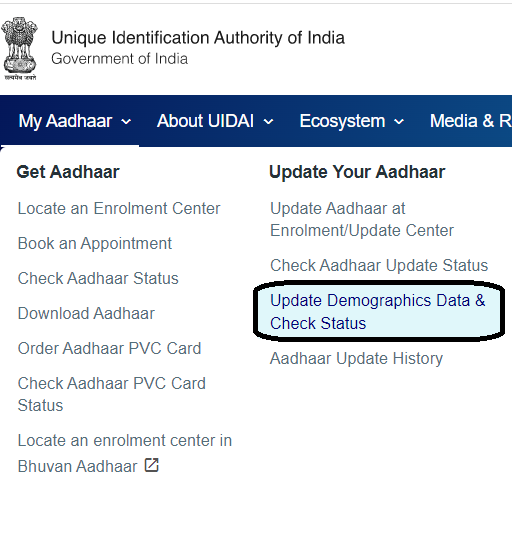
Now click where My Aadhar is shown in the page, move the cursor to My Aadhar and you will see the following website.
Click on it where you can update demographic data online.
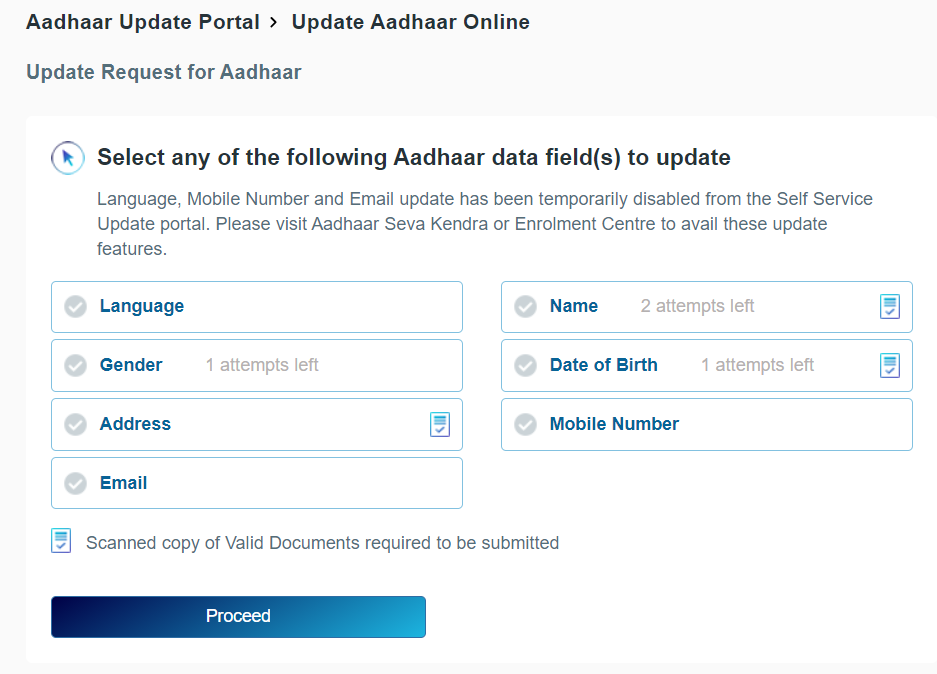
On clicking Update Demographic Data Online the following website will appear.
With this you can update your Aadhar Card sitting at home.
Name, date of birth, gender, address, language etc. can be updated in the Aadhaar Self Service Update Portal.
Click on Proceed to Update Aadhaar to update the above. After clicking you will see the following web page, in that enter your Aadhar card number along with your 12 digit Aadhar number to login, then in captcha verification enter the captcha shown next to it and click on send OTP.
So that OTP will be sent to the mobile number registered in your Aadhar card, which you have to enter in the OTP, after entering the OTP click on login.
Clicking “Login” will display the page shown below. Two options are provided for correcting your address online. You can choose one of these options to correct your address on your Aadhaar card.
On clicking Aadhar Card Update Data the following web page will open.
Aadhar card update
As shown in the web page above, you can edit the language, gender, address, name and date of birth.
You can update your Aadhaar card only if you already have a mobile number or email added to your Aadhaar card for updating.
From above, if you want to correct the address, click on it and click on Process, so that the following web page is displayed.
Aadhar card address updates
The form will open as above in which you will have to fill both English and Gujarati forms.
Care- father or mother,
house number, apartment, street, area,
Village, Taluka, District, State,
After filling the details, you have to upload the documents and make the payment only after checking the preview by clicking on Preview.
Aadhar card update payment
Aadhar card update payment
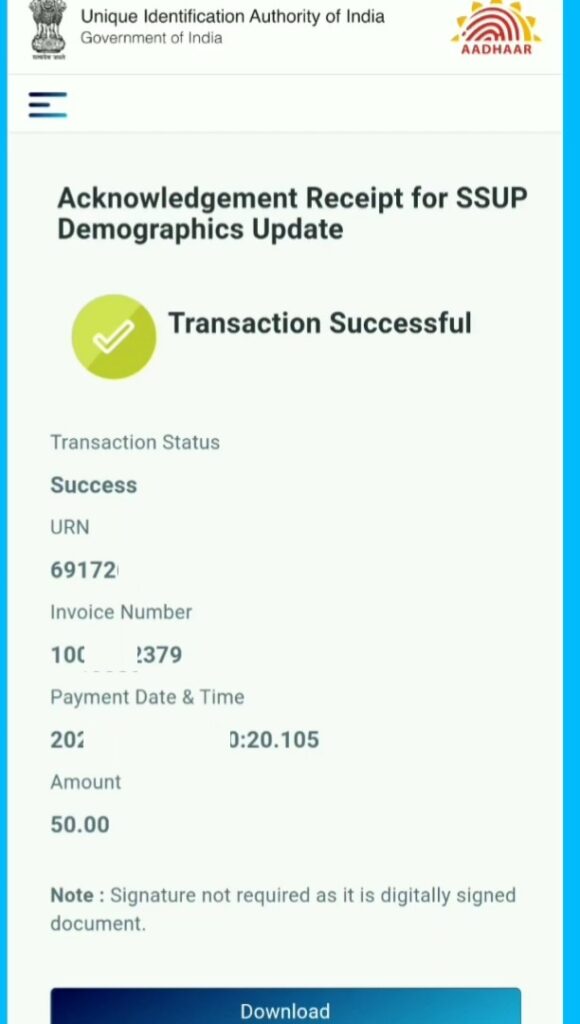
After making the payment, download the receipt to check the status, the Aadhaar card will reach your home within 30 days of update.
If Aadhar card arrives at your home in 30 days then go to the main website of Aadhar card.
After this go to My Aadhaar and check the status of Aadhaar card.
If your Aadhaar card is not used for 10 years, your Aadhaar card may be deactivated.
Share this information with all your friends, relatives, WhatsApp groups, Facebook, Instagram, Twitter, status so that it can reach every citizen.
10 Best online work from home without investment in Digital Marketing 2026. Information of YouTube, blogging, affiliate marketing, digital marketing, Web Site SEO, Google ads,
Web site design, Social Media Marketing, Facebook marketing, Whatsapp Marketing, Email Marketing, Twitter Marketing, Instagram Marketing, Youtube Marketing, SMS marketing, call marketing,
When you make money your self just goes to the website and create your account and share & sell your talent in global markets
You can create and sell everything as per the requirement of the buyer & Get $100 to $1000
online work from home in digital marketing 2026 as Digital Marketer
We should also use digital marketing extensively when the whole world is moving towards digital
Digital Marketing is the process of marketing products and services such as YouTube, private web site, blogs, Google ads, micro-niche, social media advertising, E-commercial marketing, content marketing, Email marketing
We can create all digital marketing platform self & make money from home
Let’s Do Some Work
online work from home in digital marketing 2026 as Web Site Designer
3. Choose a unique and relevant domain name for your website or blog.
4. Pick a design template if you mind.
5. Customize your website design.
6. Upload and format your own content for your website.
7. Choose and download plugging apps for the best view.
8. Preview and test your website in a search engine.
9. Publish your website on the global market.
online work from home in digital marketing 2026 as Youtube
How to Create your YouTube Channel yourself.
1. Sing up with your Gmail account in YouTube 2. Go to setting and create your YouTube name. 3. The next step off go to YouTube studio.
Create your video you to if your mind & Sum preparation when you upload video
1. Make a thumbnail for youtube channel, 2. Add a proper title, 3. Add your video description, 4. Add card- you can promote other videos 5. Visibility and save your video on the YouTube channel.
Best Video Screen Recorder for Record Your Videos
You can capture an area of your screen as either a screenshot graphic or a video recording. OBS Studio is the best screen recording software Other than Screen Recorder and it’s free.
1. iSpring Free Cam 2. Windows Game Bar 3. Screencast-O-Matic 4. Icecream Screen Recorder 5. OBS (Open Broadcaster Software)
Best Video Editing Software for Your Videos
1. Shotcut 2. KineMaster 3. Pinnacle Studio 4. Adobe Premiere Pro 5. Final Cut Pro X
online work from home in digital marketing 2026 as Blogging
Creating your own personal blog takes a few steps for create Blog.
First, you need to decide the name for your blog also called a domain name, and choose the best blogging platform we recommend going with the self-hosted platform.
There are few choices when it comes to self-hosted platforms but the most popular is Blogger.
The purpose of a blog is to connect to the relevant audience for Know about them.
Blogging for business, projects, or anything else that might bring you money has to rank your website higher in Google
1. Choose the right website builder for you
2. Choose a domain & hosting plan for suits your needs and budget or use Blogger.com promote by Google
3. Create content in your best Knowledge niche to rank in Google
4. Using your blog as a content marketing tool for your business.
5. Use Best Plugging and SEO To Rank Your Blog.
Rank Math SEO
Yoast SEO
All Plugging is Very Use for Modify & Prepare Web Site And Blog.
online work from home in digital marketing 2026 as Affiliate Marketing
The idea behind it is that you promote other people’s products, often through an affiliate network, earning a commission if people actually end up buying thanks to your marketing.
If you have no product and want to make money, then you can promote a product that you feel has value and earn an income from it as an affiliate marketer.
Run your affiliate marketing ads you have to require your brand as a youtube channel, blogs, website & other advertising plate form so first make a brand and make money easily.
online work from home in digital marketing 2026
1. Becoming an affiliate partner privately or through ad networks. 2. Selling ad space on your blog privately or via Google AdSense. 3. Selling your own digital products such as eBooks and tutorials.
online work from home in digital marketing 2026 as Social Media Advertising
The most used one in the world today is Social Media for advertising because all people use Social Media as every time for every work,
You can advertise your ads as massage ads, photo ads, videos ads, stories ads, carousel ads, slideshow ads, collection ads, lead generation ads, followers, app installs, awareness, audience considerations, promotes
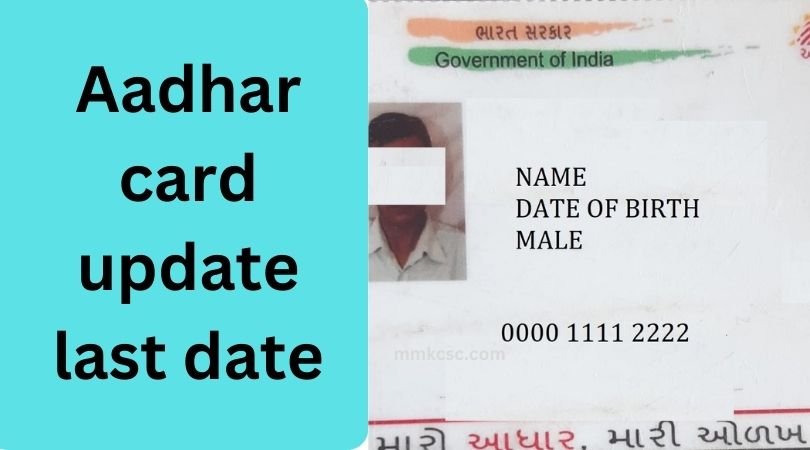
A new update has just come in the Aadhar card update last date, Aadhar card update last date in which it has been told that you have to update the Aadhar card older than 10 years, if you do not update it, then your Aadhar card may be closed.
Because when Aadhar cards were made 10 years ago, almost no documents were being asked for. Similarly, Aadhar cards of many people have been made. That is why the government is asking to update the documents in the Aadhaar card. If you have not updated the documents in your Aadhaar card then your Aadhaar card may be closed soon.
The government has asked to update the Aadhaar card many times, but many people are still not updating it. Therefore, the government has extended the date for updating the Aadhaar card.
You can update your Aadhaar card on your own, you do not have to pay any charge for this or you can also get the documents updated in your Aadhaar card by visiting the nearest Aadhaar centre.
Aadhar card update last date
To update the document in Aadhaar card, you have to go to Google and type UIDAI and search.
As soon as you search, you will first see the website, you have to click on it.
After the website opens, you will see the login option in which you have to log in by entering your Aadhaar card number. For this, an OTP will be sent to your Aadhaar registered mobile number.
Aadhar card update last date
After logging in, you will see the option of document update on which you have to click.
Aadhar card update last date ( Aadhar card New Update)
As soon as you click, you will see all your details here which you have to verify and click on Next.
Whatever document you have, you have to scan it and keep it, after that select that document, upload it and click on Next.
As soon as you click next, the document will be updated in your Aadhaar card and a receipt will be given to you. This receipt will be given to you absolutely free of cost. There is no charge for this.
But if you updated the document in your Aadhar card after Aadhar card update last date 14/06/2025 then you will have to pay ₹50.
Aadhar card update last date is 14/06/2025. You can update the documents in your Aadhar card absolutely free of cost.
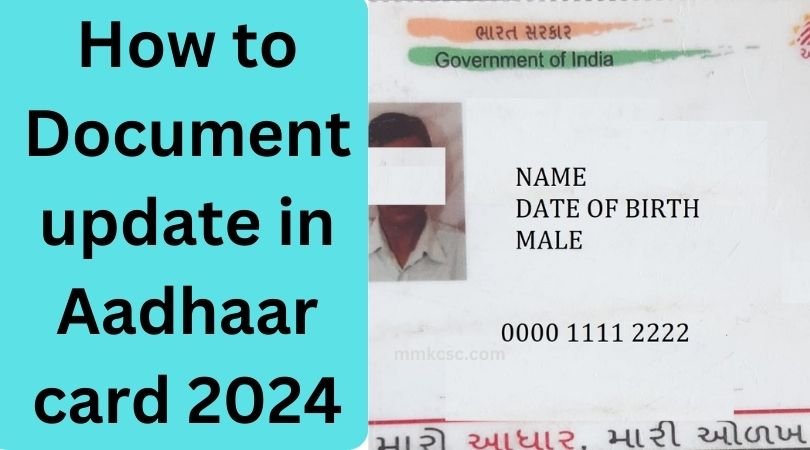
How to Document update in Aadhaar card 2025:- When the making of Aadhaar card started, if any document was not submitted with the Aadhaar card or it was yet to be submitted or your Aadhaar card is older than 10 years, then it is necessary for you to update the document in your Aadhaar card(How to Document update in Aadhaar card 2025).
Today we will see complete information about how to update documents in Aadhaar card. So that you can update documents in Aadhaar card by yourself.
How to Document update in Aadhaar card 2025
To update the document in Aadhaar card, first of all you have to go to the official website of Aadhaar card.
For this, you have to go to Google and type UIDAI in Google, after typing UIDAI, the UIDAI website will appear first below, on which you have to click.
Post Article
How to Document update in Aadhaar card 2025
Who is Required To document update in Aadhaar Card
After clicking on the website, you will see the login option in which you have to fill in your Aadhaar card number and captcha and click on send OTP. By clicking on send OTP, an OTP will come on your mobile which you have to enter to login.
After logging in, the first option you will see is to update the document in the Aadhaar card, click on it. As soon as you click, you will see the full details of the Aadhaar card which you have to verify and after verifying, you have to select your document.
You have to select the document that you have so that you can upload it. After checking the document, you have to upload it. After uploading, you have to click on the submit button and your document will be updated in the Aadhaar card.
If you do not know, there is no charge for updating the documents in the Aadhar card till 14 June 2025, so if possible, get the documents updated in your Aadhar card as soon as possible so that you can make your Aadhar card safe and strong.
Who needs to update documents in Aadhaar card? >Whose Aadhaar card is older than 10 years
Which documents are required to be updated in the Aadhaar card? > It is necessary to update the ID proof and address proof.
Information has been provided about the various uses of Aadhar Card Address Change Documents. We search for documents required for aadhar card address change and documents required to change address in Aadhar card in Google. So that we can know about Aadhaar address update documents. In this way we can also see Aadhaar address change documents from UIDAI website.
Here is a list of the documents required to change the address in the Aadhaar card.
Aadhar Card Address Change Documents List
1.Voter Card
If your new address is updated in your Voter Card then you can update your Aadhar Card address from Voter Card.
2. Ration Card
Even if your address is there in your ration card, you can change the address in your Aadhaar card.
3. Indian Passport
If you have a passport, you can change the address in your Aadhaar card using your passport.
4. Disability Identity Card
If you have any disability, you must have a Disability Identity Card, through which you can change the address in the Aadhaar card.
5. Photograph Identity Card issued by Central Govt.
If you are a government officer or a student or other worker in a government school or college, then you will have a government ID card, through which you can change the address in the Aadhaar card.
6. Transgender Identity Card
If you are a Transgender, then you will have a Transgender Identity Card, using which you can change the address in the Aadhaar card.
7. ST/ SC/ OBC Certificate issued by Central Govt.
If you have got a caste certificate of SC/ST/OBC, then it will have your address, you can also change the address in the Aadhar card through the caste certificate.
8. Village Panchayat Head
If you live in a village, you can easily change your address by getting this form verified and stamped by the Sarpanch or Mukhiya.
9. Electricity Bill
If you have a light bill in your name, then you can change the address in your Aadhaar card through the light bill. But the light bill should not be more than 3 months old.
10. Gas Connection Bill
If you have a gas bill in your name, then you can change the address in your Aadhaar card through the light bill. But the gas bill should not be more than 3 months old.
11. Water Bill
If you have a water bill in your name, then you can change the address in your Aadhaar card through the light bill. But the water bill should not be more than 3 months old.
12. Telephone Landline Bill
If you have a telephone bill in your name, then you can change the address in your Aadhaar card through the electricity bill. But the telephone bill should not be more than 3 months old.
Aadhar Card Address Change Documents after Marriage
If you are married and you have just got married, then you will not have any document, so how you can change your address in Aadhaar card is given below.
You can change the address in your Aadhaar card after getting your identity card certificate made.
You can also change the address in your Aadhaar card through Head of Family.
You can change the address in your Aadhaar card by getting the signature of the Panchayat Mukhiya or District Panchayat Mukhiya or any one of the officers given in the UIDAI form.
Here is a list of documents with which you can change the date of birth in the Aadhar card. With the help of which you can easily change the date of birth in your Aadhar card. Under the new update of UIDAI, you can no longer change the date of birth at home or online, for this you will have to go to the nearest Aadhaar center and from there you can change the date of birth in the Aadhaar card.
1. Birth Certificate issued by Authorized Authority
If you have Aadhar Card date of birth change document, then you can change the date of birth in Aadhar card with the birth date certificate. Everyone born within 20 years will have a birth date certificate. But before that many people do not have the Date of Birth Certificate, so you can also get the Date of Birth Certificate by applying for it. If you still do not get your date of birth certificate, then you can change the date of birth in your Aadhar card with the document given below.
2. Service Photo Identity Card issued by Central Govt.
If you work in the government, then you will have a Government ID. You can use the Government ID card in the Aadhar Card date of birth Change document and any changes can be made in your Aadhar Card through your Government ID.
Date of Birth Change In Aadhar card Document
3. Pensioner Photo Identity Card
If you are getting pension, then you must have a pension ID, through that also you can change the birth date in Aadhaar card.
4. Indian Passport
If you have got a passport, then you can change the birth date in your Aadhaar card through passport also.
Aadhar Card DOB Change Document
5. Mark sheet/ Certificate issued by recognized Board of Education
If you have passed SSC or HSC, then you will have a mark sheet certificate in which the date of birth is also mentioned. You can also change the date of birth in the Aadhar card.
6. Transgender Identity Card
If you are transgender or have got transgender then you will have transgender ID or certificate with which you can change the date of birth in Aadhaar card.
If there is any problem with the address on your Aadhaar card and you want to correct it, then click here. Here is complete information about the documents required to correct the address on the Aadhaar card. Aadhar Card Address Change Documents -New Update.
FAQ’S For Aadhar Card date of birth Change documents.
Can the date of birth be changed in Aadhaar card ?
Yes, it could be possible.
2.How many times can the date of birth be changed in Aadhaar card?
To change the date of birth in your Aadhaar card for the second time, you will have to visit or contact the UIDAI Regional Office.
3. What is the common Aadhar Card date of birth change document to change the date of birth in Aadhar card?
Date of Birth Certificate can be got in the easiest way and everyone has it.
4. Can the date of birth be changed from PAN card to Aadhaar card?
No, under the new update of UIDAI, now the date of birth cannot be changed from PAN card to Aadhaar card. Although earlier the date of birth could be changed from PAN card to Aadhaar card.
5. Is there any way by which we can change the date of birth in Aadhaar card without any document ?
Yes, you can change the date of birth in Aadhar Card through Self Declaration Form without providing any Aadhar Card date of birth Change documents. You do not need any valid document for this.
We will see what new update has come in Ration card KYC New Update 2025 and we will also know what is the benefit of KYC in Ration card KYC Benefit 2025 in this post.
Ration card KYC New Update 2025
A new update has come in the Ration Card KYC (Ration card KYC New Update 2025) that the old application of ration card has been updated. Earlier there were many extensions, so people were facing a lot of difficulty in doing KYC. People were not able to do KYC on their own. Sometimes there was an error in the message, sometimes the OTP was not coming and the biggest problem was with the photo, whenever we were going to do KYC, our photo was not matching. Now all these problems have been resolved with the update of this application, hence now you can easily do your KYC.
Ration card KYC Benefit 2025
We are getting these benefits by doing ration card KYC. Now any member of the family can get the goods. Earlier, only those whose ration card was linked to Aadhar card were able to get ration, other people were not able to get it. After KYC, whenever we bring ration, we get a message immediately. We are also getting information about the arrival of grains in the go down through SMS.
Ration card KYC Online
Complete information about how to do online ration card KYC (Ration card KYC New Update 2025) is given here.
Go to Google Pay Store and install My Ration application.
Open the application and register yourself with your mobile number. You will have to enter your name and mobile number in the registration.
After registration is done, login again.
After logging in, click on Aadhaar KYC.
Here you will see your ration card number, check it and proceed further by filling the captcha.
Select your name and proceed further.
Enter the OTP that will be sent to the mobile number registered in your Aadhaar and click on the submit button.
Enter your mobile number again and click on send OTP.
Verify the OTP received on your mobile.
After the mobile number is verified, the Aadhaar Face ID will open in which you have to take your photo. As soon as the photo is taken, your KYC will be done automatically.
Now you have to select send to office, submit it and send your data to the office.
The last date for ration card KYC has not been fixed yet, so do not worry about KYC and get your KYC done as soon as possible. So far 80% KYC has been completed and 20% is still left, KYC work will continue until 20% KYC is updated.
Ration card Online Check
To check ration card online, visit the website given here and select your state. Here on the website you have to first select your state, then select your district and after that you have to select your sub district.By selecting the sub district, you will see the list of all the villages in your sub district. Select the name of your village from this and check your ration card.
FAQ
Is it necessary to do KYC for children’s ration card?
Yes, everyone needs to do KYC
KYC of old people is not being done, what should they do?