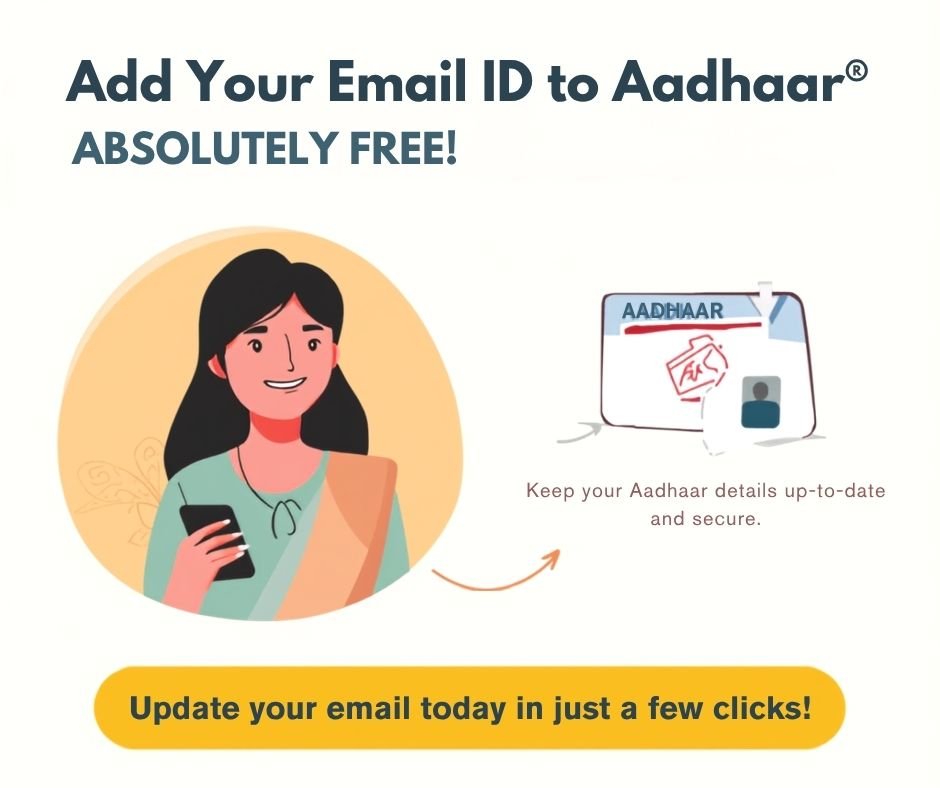
Free email update in aadhaar

Free email update in aadhaar

Complete information on how to Free email update in aadhaar card for free is provided here.

UIDAI already had the option to update mobile number in Aadhaar card, now it has also given the option to update email ID.

You can now update the email ID linked to your Aadhaar card from the comfort of your home. While there is a charge of ₹75 for updating your mobile number and address, there is no fee for updating your email ID.

Free email update in aadhaar card Process

To Free email update in aadhaar card, you need to install the Aadhaar app.

After installing, go to the ‘Services’ option and click on the email ID.

Upon clicking, an OTP will be sent to the mobile number registered with your Aadhaar card; you need to enter it.

After entering the OTP, you must provide your email ID; an OTP will then be sent to that email ID, which you will need to enter.

Once verification is complete, You Just Click on Submit Button, You have not required pay any amount. Your email ID will be updated within 24 hours, or at most, within 15 days.

If a mobile number is not already linked to your Aadhaar card, you cannot add an email ID to it, as linking a mobile number is mandatory for this process.

If your mobile number is not linked to your Aadhaar card, you can visit a nearby Aadhaar center to link it; after that, you can update your email ID on the Aadhaar card for free.

Currently, UIDAI is not charging any fee to add an email ID to an Aadhaar card. There will be no charge for this service until December 31, 2026, meaning you can add an email ID to your Aadhaar card for free during this period.

Please join our group for more information regarding Aadhaar cards. I have been working with Aadhaar cards for nearly nine years, so if you have any queries, feel free to share them with me; I will help resolve your issues. Thank you.

Name of postFree email update in aadhaar Card
Official website For Free email update in aadhaarUIDAI.gov.in
Related Other PostAadhar Card Address Change
aadhaar email link free last date31/12/2026

Aadhar Card Update last date in Free.

Friends, for many days, Aadhar Card Update last date in Free notification is coming on the official website of Aadhar Card that if your Aadhar card is more than 10 years old then get it updated today itself.

The official Aadhaar website has extended the date for updating Aadhaar cards three times, yet many people haven’t updated their Aadhaar cards. You can update your Aadhaar cards for free during these dates.

Therefore, there is still time, update the documents in your Aadhar card today and this too absolutely free.

Today we will learn how to update documents in Aadhar card.

  • To do this, first open Google.
  • Type “UIDAI” into Google and click on the first UIDAI official website that appears.
  • Login by entering your Aadhaar number.
  • Click on “Update Documents.”
  • Select your document.
  • Scan and upload your document.
  • After uploading, click the Submit button.
  • Clicking the Submit button will give you a receipt, which you can save.
  • Your document has now been updated in your Aadhaar card. This way, you can update your documents in your Aadhaar card.
Name of postAadhar Card Update last date in Free.
Official website of the postUIDAI.gov.in
Aadhar Card Address Change
Last date for Documents Udate in Aadhaar Card14 June 2027
Aadhar Card Update last date in Free

1. What is the fee for updating document in Aadhar Card?

Ans:- Fee for updating documents in Aadhar card is zero till 14 June 2027.

How to Full Name In Aadhaar Card?

How to Full Name In Aadhaar Card

How to Full Name In Aadhaar Card:- Here’s a complete guide on how to change your full name on your Aadhaar card. The required documents are also explained.

What is the process to update full name in Aadhar card? How to Full Name In Aadhaar Card Process?

  • The step-by-step process for changing your full name on your Aadhaar card is described below.
  • Open the Aadhaar Card app.
  • Go to the “My Aadhaar” option and enter your Aadhaar number.
  • Enter the captcha and click “Send OTP.”
  • You will receive an OTP on your mobile number. Enter it to log in to your portal.
  • Click “Change Name.”
  • Enter your full name.
  • Select the document you have from the provided documents.
  • Upload the document and make the payment.
  • Your application has been successfully submitted.
  • Your Aadhaar card will be updated within 24 hours to 30 days. You can check your status by using your application number.
  • Option Comming Soon In Aadhaar App

1. In how many days does it take to update the full name in the Aadhaar card?

Ans:- It may take at least 24 hours to 30 to 90 days for the full name to be updated in the Aadhaar card.

2. How much is the fee for updating the full name in Aadhaar card?

Ans:- Updating the full name in the Aadhaar card also costs Rs 125.

What documents are required to update the full name in Aadhaar card?

  • Voter Card
  • Birth Certificate
  • Caste Certificate
  • Marriage Certificate
  • Passport
  • Gadget Notification
  • Government ID Proof
  • Driving License
PostHow to Full Name In Aadhaar Card?
Aadhar card BenefitIndian Citizen
Year2026
Official WebsiteWeb site
Our Other PostAadhar Card Address Change Documents

Aadhaar card Documents Update Process > UIDAI extends the date for updating documents in Aadhaar card till 14 june 2027 free

Aadhaar card Documents Update Process

Aadhaar card Documents Update Process > UIDAI extends the date for updating documents in Aadhaar card till 14 june 2027 free :- The date for updating documents in Aadhaar card for free has been extended by UIDAI for 1 year. If you have not updated the documents in Aadhaar card yet, then you can update the documents in Aadhaar card for free till 14 June 2027.

Aadhaar card Documents Update Process can be done in two ways.

1. You can Aadhaar card Documents Update Process in your Aadhaar card by visiting an Aadhaar card center.

  • To update the documents in Aadhaar card, you will have to go to the center.
  • I will have to carry proof of identity and address along with Aadhaar card.
  • You can update documents in Aadhaar card by providing proof of identity and address along with Aadhaar card.
  • You will have to pay Rs 75 to get the document updated at the Aadhaar card center.

2. You can Aadhaar card Documents Update Process in your Aadhaar from your mobile phone while sitting at home.

  • Open the main website of Aadhaar Card.
  • Enter your Aadhaar card number and captcha and click on login.
  • After logging in, you will see different options here, from which select the option of Document Update.
  • Here you will see the documents required, document processing fees, and document processing time.
  • Then by clicking on Next, you will see the complete details of your Aadhaar card which will have to be verified.
  • Select Proof of Identity and upload the document and click on the Next button.
  • Then select Proof of Address and upload the document and click on the Next button.
  • Now that both your documents have been uploaded, click on the Submit button.
  • By clicking on the submit button, you will be taken to the payment option, here you will have to click on payment.
  • Clicking on the payment option will complete the document update process.
  • There will be no charge for self-document upload till 14th June 2017, so you will not have to pay any fee.

Identity proof for Aadhaar card Documents Update Process

  1. Voter Card,
  2. Driving License,
  3. Passport,
  4. SC ST OBC Certificate,
  5. Service Photo Identity Card,
  6. Standard Gadget Notification,
  7. Third Gender Identity Card,
  8. Ration Card,
  9. Pensioner ID Card,
  10. Mark Sheet,
  11. NREGA Job Card,
  12. Kisan Photo Passbook

Address proof for Aadhaar card Documents Update Process

  1. Bank Passbook,
  2. Light Bill,
  3. Gas Bill,
  4. Passport,
  5. Kisan Photo Passbook,
  6. Medical Insurance,
  7. NREGA Job Card,
  8. Marriage Certificate,
  9. Pension ID Card,
  10. Property Card,
  11. Ration Card,
  12. OBC Certificate,
  13. Water Card,
  14. Water Bill,
  15. Third Gender ID Card,
  16. Telephone Bill,
  17. Standard UIDAI Certificate by Village Head
PostAadhaar card Documents Update Process
Aadhaar card BenefitIndian Citizen
Official WebsiteWeb site
Our Other PostAadhar Card Address Change Documents

Aadhaar card Documents Update Process FAQ’s

1. How can documents be updated in Aadhaar?

Documents in Aadhaar card can be submitted both online and offline.

2. Can documents in Aadhaar card be updated from mobile?

Yes, document updates in Aadhaar card can be done from mobile.

3. Can documents in Aadhaar card be updated at Aadhaar Center?

Yes, document update in Aadhaar card can be done at Aadhaar Center.

4. How much does it cost to update documents in Aadhaar card?

It costs Rs 75 to update documents in Aadhaar card.

5. How much does it cost to update documents in Aadhaar card yourself?

If you update the documents in Aadhaar card yourself, you will not Pay any money.

Aadhaar card face scanner app free download

Aadhaar card face scanner app free download

Complete information on how to download Aadhaar card face scanner app for free is available here.

Aadhaar card face scanner app free download Details

To download Aadhaar Face Rd for free, first open the Play Store. Search for Aadhaar Face Rd and install the first Aadhaar Face Rd application that appears.

After installing Aadhaar Face Rd, you can use all the features related to Aadhaar Face Rd. You do not need to do anything else for this. Whenever you want to use any feature related to Aadhaar Face Rd, the application automatically detects it and the Face ID icon appears. By selecting it, you can avail the face ID feature.

Where is Aadhaar Face Rd used?

  1. All types of KYC can be done through Aadhaar Face Rd.
  2. FaceRD is used to withdraw money.
  3. To make corrections in Aadhaar card, you can also make corrections in Aadhaar card by scanning it with Aadhaar Face Rd.
  4. Now we can update the address and mobile number in the Aadhaar application using Aadhaar Face Rd.
  5. We can do bank KYC using Aadhaar Face Rd.
  6. Aadhaar Face ID is also used to activate PF account.
  7. In Jeevan Pramaan Patra also, you can make Jeevan Pramaan Patra using Aadhaar Face Rd.
  8. Now even in banks, offices and companies, attendance is taken using Face RD
PostHow to download Aadhaar card face scanner app free download?
Aadhar card BenefitIndian Citizen
Year2026
Official WebsiteWeb site
Our Other PostHow to Full Name In Aadhaar Card

How to download Aadhar card online?

How to download Aadhar card online? Many times we lose our Aadhar card or if we have got our Aadhar card made but are unable to find it, then complete information on how you can download Aadhar card is given here.

You can get Aadhar card in three ways.

  1. You can download Aadhar card using Aadhar number.
  2. You can download Aadhar card using the enrollment number.
  3. You can also download Aadhar card through Virtual ID.

We will know how we can get Aadhar card through all three methods.

  • For this, first of all we have to go to Google and type UIDAI.
  • By typing UIDAI, we will see the official website of Aadhar Card, we have to click on it.
  • After the official website opens, go to My Aadhaar or Download Aadhaar Card.
  • You can directly get your Aadhaar card by going to My Aadhaar and logging in with Aadhaar number and OTP, that is, you can download your Aadhaar card.
  • If you do not want to get your Aadhar card in this way then click on the download option.
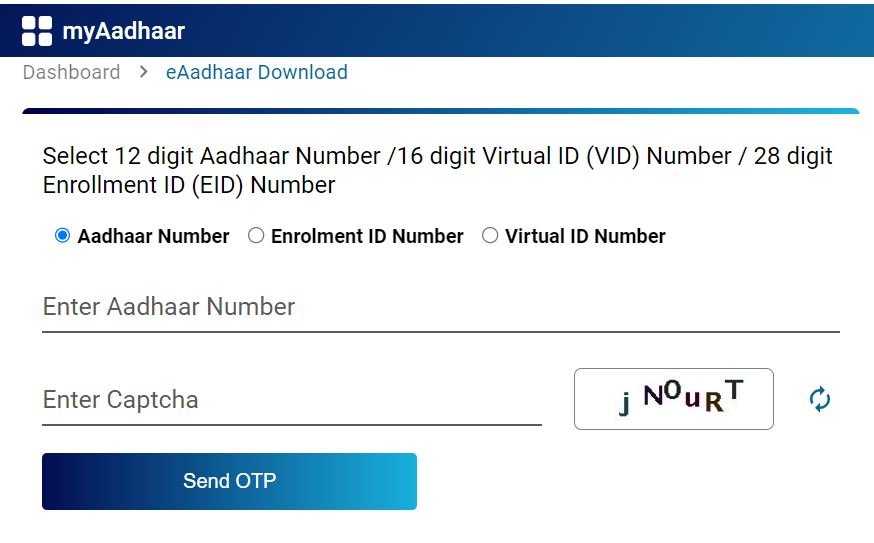
  • By clicking on the Aadhar Card download option, you will see three types of options, out of which you have to click on the Aadhar number option.
  • Enter your Aadhaar number and Fill the captcha.
  • Click on Send OTP.
  • After sending the OTP, you will see an option here: DO you Want to Marked Aadhar card? You should not click on this option, otherwise your Aadhar card will appear marked i.e. with X. You will only see the last four digits, hence you should never click on this option.
  • Enter the OTP.and Click on Submit.
  • Your Aadhar card will be downloaded.
How to download Aadhar card online?

How to open pdf of Aadhaar card?

  • After the Aadhar card is downloaded, it will ask you for a password in which you have to write the first four letters of your name and date of birth Year.
  • Example :- RAMA2023
  • As soon as you enter the name in this way, your Aadhar card will open.
  • You can now save your Aadhaar card in PDF or if you have a printer, then print it.
  • You can download your Aadhaar card by entering the enrollment number and virtual ID and you can also open your PF by entering the password given.
  • For more information visit our main website MMK CSC.

How to download Aadhar card online FAQ

1. We can download Aadhar card online without Aadhar card number, Enrollment ID and virtual ID.

Ans :- Yes, Using Mobile Number, name and date of birth as per aadhaar card.

2. We can download Aadhar card online and Open It without Password?

Ans :- Yes, Using Password remove tool and and you can open in Easily.

How to download Aadhar card online?

Ans:- We can download aadhar card online and offline.

Download Aadhar card with mobile number

Download Aadhar card with mobile number

There is a need to download the Aadhar card (Download Aadhar card with mobile number). Because sometimes we may have updated the Aadhar card or have made some correction in the name, then we need to download the Aadhar card again.

Apart from this, when our Aadhaar card is lost or torn or damaged due to any reason, it becomes necessary for us to get the Aadhaar card again.

Download Aadhar card with mobile number

Today we will know how we can download Aadhar card. We can download Aadhar card in three ways.

  1. By Aadhar card number
  2. From VID
  3. By enrollment number

We can download Aadhar card through these three methods.

For this, first of all we have to go to Google and type UIDAI.

Type and search and click on the first website that comes up. Here you have to go to the download option. By going to the download option, you will see three options which I have mentioned above. By entering and submitting the details of any of these three, an OTP will be sent to your Aadhaar registered mobile number, which you will have to enter and your Aadhaar card will be downloaded as soon as you enter it.

Whichever method you use from the above mentioned methods, it is necessary to have your mobile number registered in all of them.

E Aadhar card download app

It has been explained how to download Aadhar card through application (Download Aadhar card with mobile number). For this, you will have to go to Play Store and download the My Aadhar application.After that you have to register by entering your mobile number. After registering, you can download your Aadhaar card using any of the methods I have mentioned above.

E Aadhar card download online PDF 

To download Aadhaar card in PDF, we have to go to the main website of Aadhaar card UIDAI.

Go to the Aadhar card download option.

Enter your Aadhaar number and fill the captcha and click on submit button.

As soon as you submit, an OTP will come on your Aadhaar registered mobile, enter it, as soon as you enter, the Aadhaar card will be downloaded in PF on your mobile.

PostDownload Aadhar card with mobile number
Aadhar card BenefitIndian Citizen
Year2026
Official WebsiteWeb site
Our Other PostAadhar Card Address Change Documents

आधार कार्ड में मोबाइल नंबर लिंक कैसे करें। How To Link Mobile Number In Aadhar Card Online From Home

How To Link Mobile Number In Aadhar Card

How To Link Mobile Number In Aadhar Card :- आधार कार्ड में मोबाइल नंबर लिंक दो तरीकों से होता है। पहला आधार कार्ड सेंटर पर जाकर अपने आधार कार्ड में मोबाइल नंबर लिंक करवाई और दूसरा घर बैठे मोबाइल से आधार कार्ड में मोबाइल नंबर लिंक करें।

Offline Mobile Number Link In Aadhar card

पहला ऑप्शन है जो आधार कार्ड में मोबाइल नंबर लिंक करने का वह आप सभी को पता है। आप आधार कार्ड सेंटर पर जाकर अपने आधार कार्ड में मोबाइल नंबर लिंक करवा सकते हैं।

दूसरा अपने आप घर बैठे आधार कार्ड में मोबाइल नंबर लिंक कैसे करें इसकी पूरी जानकारी इस पोस्ट में दी गई है। ताकि, आप घर बैठे (Mobile Number Link In aadhar card)अपने आधार कार्ड में मोबाइल नंबर लिंक कर सके।

How To Link Mobile Number In Aadhar Card Online From Home

इसके लिए आपको सबसे पहले Google प्ले स्टोर ओपन कर लेना है और AAdhaar सर्च करना है। यहां पर आपको आधार कार्ड की एप्लीकेशन Aadhaar दिखाई देगी। उसे डाउनलोड करके इंस्टॉल कर लेना है।

एप्लीकेशन को ओपन कर के अपने आधार कार्ड नंबर से लॉगिन कर लेना है।

लॉगिन करते ही आपको अपने आधार कार्ड की पूरी जानकारी दिखाई देगी।

यहां पर आपको अपडेट आधार वाला ऑप्शन दिखाई देगा। उसे पर क्लिक करना है और आगे की प्रक्रिया करना है।

अपडेट आधार वाले ऑप्शन पर क्लिक करने से आपको Mobile Number Link का ऑप्शन दिखाई देगा। इसके साथ आपको एड्रेस अपडेट वाला भी ऑप्शन दिखाई देगा और नाम एड्रेस वाला ऑप्शन भी दिखाई देगा।

यहां पर आपको Mobile Number Update वाले ऑप्शन पर क्लिक करना है और नेक्स्ट पर क्लिक करना है।

अपना मोबाइल नंबर दाखिल करें और सेंड ओटीपी पर क्लिक करें।

आपके मोबाइल में एक ओटीपी आएगा उसे दाखिल करें। ओटीपी दाखिल करने के बाद सबमिट बटन पर क्लिक करें।

सबमिट बटन पर क्लिक करने से आपको पेमेंट वाला ऑप्शन दिखाई देगा। यहां पर आपको पेमेंट कर देना है। ताकि, आपकी एप्लीकेशन सक्सेसफुली सबमिट हो जाए

पेमेंट करने के बाद आपकी एप्लीकेशन सबमिट हो गई है। अब आपका मोबाइल नंबर 24 घंटे या दो-तीन दिन में अपने Aadhar Card में Mobile Number Update हो जाएगा।

आप इस तरह अपने आधार कार्ड में घर बैठे Online Mobile Number Link In Aadhar Card कर सकते हैं। इसी के साथ आप अपने घर के किसी भी मेंबर का आधार कार्ड में मोबाइल नंबर लिंक कर सकते हैं। इसी के लिए आपको यही प्रक्रिया फॉलो करनी है।

Postआधार कार्ड में मोबाइल नंबर लिंक कैसे करें। How To Link Mobile Number In Aadhar Card
Aadhaar card mobile number link BenefitIndian Citizen
How To Link Mobile Number In Aadhar Card OnlineOnline And Offline
Official WebsiteWeb site
Our Other PostAadhar card address Change in 24 Hours
Whatapp GruopJoin

आधार कार्ड में मोबाइल नंबर लिंक कैसे करें। How To Link Mobile Number In Aadhar Card Online

How To Link Mobile Number In Aadhar Card

How To Link Mobile Number In Aadhar Card Online :- आधार कार्ड में मोबाइल नंबर लिंक दो तरीकों से होता है। पहला आधार कार्ड सेंटर पर जाकर अपने आधार कार्ड में मोबाइल नंबर लिंक करवाई और दूसरा घर बैठे मोबाइल से आधार कार्ड में मोबाइल नंबर लिंक करें।

Offline Mobile Number Link In Aadhar card

पहला ऑप्शन है जो आधार कार्ड में मोबाइल नंबर लिंक करने का वह आप सभी को पता है। आप आधार कार्ड सेंटर पर जाकर अपने आधार कार्ड में मोबाइल नंबर लिंक करवा सकते हैं।

दूसरा अपने आप घर बैठे आधार कार्ड में मोबाइल नंबर लिंक कैसे करें इसकी पूरी जानकारी इस पोस्ट में दी गई है। ताकि, आप घर बैठे (Mobile Number Link In aadhar card)अपने आधार कार्ड में मोबाइल नंबर लिंक कर सके।

How To Link Mobile Number In Aadhar Card Online From Home

इसके लिए आपको सबसे पहले Google प्ले स्टोर ओपन कर लेना है और AAdhaar सर्च करना है। यहां पर आपको आधार कार्ड की एप्लीकेशन Aadhaar दिखाई देगी। उसे डाउनलोड करके इंस्टॉल कर लेना है।

एप्लीकेशन को ओपन कर के अपने आधार कार्ड नंबर से लॉगिन कर लेना है।

लॉगिन करते ही आपको अपने आधार कार्ड की पूरी जानकारी दिखाई देगी।

यहां पर आपको अपडेट आधार वाला ऑप्शन दिखाई देगा। उसे पर क्लिक करना है और आगे की प्रक्रिया करना है।

अपडेट आधार वाले ऑप्शन पर क्लिक करने से आपको Mobile Number Link का ऑप्शन दिखाई देगा। इसके साथ आपको एड्रेस अपडेट वाला भी ऑप्शन दिखाई देगा और नाम एड्रेस वाला ऑप्शन भी दिखाई देगा।

यहां पर आपको Mobile Number Update वाले ऑप्शन पर क्लिक करना है और नेक्स्ट पर क्लिक करना है।

अपना मोबाइल नंबर दाखिल करें और सेंड ओटीपी पर क्लिक करें।

आपके मोबाइल में एक ओटीपी आएगा उसे दाखिल करें। ओटीपी दाखिल करने के बाद सबमिट बटन पर क्लिक करें।

सबमिट बटन पर क्लिक करने से आपको पेमेंट वाला ऑप्शन दिखाई देगा। यहां पर आपको पेमेंट कर देना है। ताकि, आपकी एप्लीकेशन सक्सेसफुली सबमिट हो जाए

पेमेंट करने के बाद आपकी एप्लीकेशन सबमिट हो गई है। अब आपका मोबाइल नंबर 24 घंटे या दो-तीन दिन में अपने Aadhar Card में Mobile Number Update हो जाएगा।

आप इस तरह अपने आधार कार्ड में घर बैठे Online Mobile Number Link In Aadhar Card कर सकते हैं। इसी के साथ आप अपने घर के किसी भी मेंबर का आधार कार्ड में मोबाइल नंबर लिंक कर सकते हैं। इसी के लिए आपको यही प्रक्रिया फॉलो करनी है।

Postआधार कार्ड में मोबाइल नंबर लिंक कैसे करें। How To Link Mobile Number In Aadhar Card Online
Aadhaar card mobile number link BenefitIndian Citizen
How To Link Mobile Number In Aadhar Card OnlineOnline And Offline
Official WebsiteWeb site
Our Other PostAadhar card address Change in 24 Hours
Whatapp GruopJoin

How To Link Mobile Number In Aadhar Card Online के रिलेटेड कोई भी जानकारी के लिए MMK CSC सर्च करें और ज्यादा जानकारी के लिए हमारा व्हाट्सएप ग्रुप ज्वाइन करें।

आधार कार्ड एड्रेस चेंज करें > Aadhar Card Address Change

Aadhar Card Address Change

आधार कार्ड में एड्रेस चेंज (Aadhar Card Address Change) करना अब बहुत आसान हो गया है, और तुरंत ही हो जाता है आप 24 घंटे में आधार कार्ड में एड्रेस चेंज कर सकते हैं।

आप अपने आधार कार्ड में एड्रेस कैसे चेंज कर सकते हैं उसकी पूरी जानकारी इस पोस्ट में दी गई है।

आधार कार्ड में एड्रेस चेंज दो तरीके से हो सकते हैं एक आप अपने डॉक्यूमेंट लगाकर आधार कार्ड में एड्रेस चेंज कर सकते हैं।

दूसरा हेड ऑफ फैमिली, अपने फैमिली मेंबर के आधार कार्ड के हिसाब से आप अपने आधार कार्ड में एड्रेस चेंज कर सकते हैं।

यहां पर हम दोनों तरीके से आधार कार्ड में एड्रेस कैसे चेंज कर सकते हैं।

डॉक्यूमेंट द्वारा आधार कार्ड में एड्रेस चेंज करें। Documents Base Aadhar Card Address Change

डॉक्यूमेंट द्वारा अपने आधार कार्ड में एड्रेस चेंज करने के लिए आपको आधार कार्ड की मुख्य वेबसाइट ओपन कर लेनी है।

लॉगिन वाले ऑप्शन पर जाए और आधार कार्ड नंबर डालकर सेंड ओटीपी पर क्लिक करें।

अपने आधार कार्ड में जो मोबाइल नंबर लिंक है, उसे पर एक ओटीपी आएगा, उसे दाखिल करें।

ओटीपी दाखिल करने के बाद ,आप लॉगिन कर चुके होंगे और आपको अपने आधार की पूरी डिटेल दिखाई देगी।

यहां पर अलग-अलग ऑप्शन दिया गया है। जिसमें से आधार कार्ड ऐड्रेस अपडेट वाले ऑप्शन को चयन करें।

आधार कार्ड ऐड्रेस अपडेट वाला ऑप्शन चुनने के बाद आपको अपने एड्रेस को दाखिल करने का ऑप्शन दिखाई देगा, जिसमें आपको अपने डॉक्यूमेंट के हिसाब से पूरी डिटेल दाखिल करनी होगी।

जैसे कि अपने एरिया का नाम, अपने घर का नंबर, गांव का नाम, तहसील का नाम, राज्य का नाम और पिन कोड दाखिल करें।

पूरी डिटेल भर जाने के बाद आपको एक बार वेरीफाई कर लेना है। ताकि, आपका आधार कार्ड में कोई गलती न हो।

डॉक्यूमेंट वाले ऑप्शन पर क्लिक करें और अपने पास जो डॉक्यूमेंट है उसका चयन करें।

डॉक्यूमेंट को पहले से ही स्कैन करके रखना है या फिर प्रिंटर में स्कैन करके अपलोड करें।

डॉक्यूमेंट अपलोड हो जाने के बाद पेमेंट वाला ऑप्शन आएगा यहां पर आपको पेमेंट वाले ऑप्शन में जाकर पेमेंट कर देना है।

पेमेंट करते ही आपकी एप्लीकेशन सबमिट हो जाएगी और 24 घंटे में आधार कार्ड में एड्रेस चेंज हो जाएगा।

हेड ऑफ फैमिली द्वारा अपने आधार कार्ड में एड्रेस चेंज करें। Head of Family Base Aadhar Card Address Change

आधार करके मुख्य वेबसाइट ओपन कर लेनी है और लोगों वाले ऑप्शन में जाकर लोगों कर लेना है।

लोगिन करने के लिए आपको अपने आधार नंबर दाखिल करना है और कैप्चा भर के सेंड ओटीपी पर क्लिक करना है। अपने मोबाइल में एक ओटीपी आएगा उसे दाखिल करें और सबमिट करें।

ओटीपी सबमिट करते ही आपको अपने आधार कार्ड की पूरी डिटेल दिखाई देगी। यहां पर आधार कार्ड एड्रेस चेंज वाले ऑप्शन पर क्लिक करें और आगे की प्रक्रिया करें।

अपने हेड ऑफ फैमिली का आधार नंबर दाखिल करें और नीचे अपने हेड ऑफ फैमिली के साथ जो संबंध है उसका चयन करें।

आधार नंबर और हेड ऑफ फैमिली का रिलेशन सेलेक्ट करने के बाद आपको सबमिट बटन पर क्लिक करना है और पेमेंट वाले ऑप्शन पर जाकर पेमेंट कर देना है।

पेमेंट हो जाने के बाद आपकी एप्लीकेशन सक्सेसफुली सबमिट हो जाएगी। बाद में 24 घंटे के बाद आप अपने आधार कार्ड में एड्रेस चेक कर सकते हैं। 24 घंटे के बाद आपके आधार कार्ड में एड्रेस चेंज हो जाएगा।

Aadhar Card Address Change Highlight

Post24 घंटे में आधार कार्ड एड्रेस चेंज करें > Aadhar Card Address Change
Aadhaar card Address Change BenefitIndian Citizen
How to change address in Aadhaar card onlineOnline And Offline
Official WebsiteWeb site
Our Other PostAadhaar card New Update.
Whatapp GruopJoin

आप अपने आधार कार्ड में घर बैठे दो तरीकों से एड्रेस चेंज कर सकते हैं। डॉक्यूमेंट द्वारा और हेड ऑफ फैमिली द्वारा आप अपने आधार कार्ड में एड्रेस आसानी से चेंज कर सकते हैं। इसके लिए आपको कहीं जाने की भी जरूरत नहीं है इस तरह आप अपने और अपने फैमिली मेंबर के आधार कार्ड में बड़ी आसानी से एड्रेस चेंज कर सकते हैं।