How to download Aadhar card online? Many times we lose our Aadhar card or if we have got our Aadhar card made but are unable to find it, then complete information on how you can download Aadhar card is given here.
You can get Aadhar card in three ways.
- You can download Aadhar card using Aadhar number.
- You can download Aadhar card using the enrollment number.
- You can also download Aadhar card through Virtual ID.
We will know how we can get Aadhar card through all three methods.
- For this, first of all we have to go to Google and type UIDAI.
- By typing UIDAI, we will see the official website of Aadhar Card, we have to click on it.
- After the official website opens, go to My Aadhaar or Download Aadhaar Card.
- You can directly get your Aadhaar card by going to My Aadhaar and logging in with Aadhaar number and OTP, that is, you can download your Aadhaar card.
- If you do not want to get your Aadhar card in this way then click on the download option.
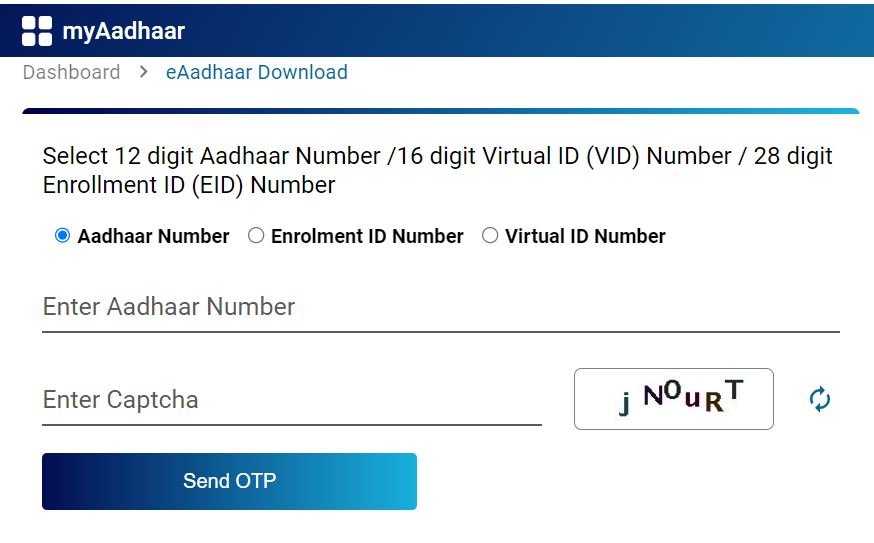
- By clicking on the Aadhar Card download option, you will see three types of options, out of which you have to click on the Aadhar number option.
- Enter your Aadhaar number and Fill the captcha.
- Click on Send OTP.
- After sending the OTP, you will see an option here: DO you Want to Marked Aadhar card? You should not click on this option, otherwise your Aadhar card will appear marked i.e. with X. You will only see the last four digits, hence you should never click on this option.
- Enter the OTP.and Click on Submit.
- Your Aadhar card will be downloaded.
How to open pdf of Aadhaar card?
- After the Aadhar card is downloaded, it will ask you for a password in which you have to write the first four letters of your name and date of birth Year.
- Example :- RAMA2023
- As soon as you enter the name in this way, your Aadhar card will open.
- You can now save your Aadhaar card in PDF or if you have a printer, then print it.
- You can download your Aadhaar card by entering the enrollment number and virtual ID and you can also open your PF by entering the password given.
- For more information visit our main website MMK CSC.
How to download Aadhar card online FAQ
1. We can download Aadhar card online without Aadhar card number, Enrollment ID and virtual ID.
Ans :- Yes, Using Mobile Number, name and date of birth as per aadhaar card.
2. We can download Aadhar card online and Open It without Password?
Ans :- Yes, Using Password remove tool and and you can open in Easily.
How to download Aadhar card online?
Ans:- We can download aadhar card online and offline.